Permits & plan review
Online or office applications, automatic routing to zoning, building and fire review, corrections, and one-click permit issuance with required inspections created for you.
One system for the building department of a small town, village or township: online applications, plan review, fees, inspections, fire safety schedules, operating permits and complaints. Your state and Census reports are compiled from your records.
Choose your state to see availability and how Civicmill handles your state's requirements.
State building codes ask every municipality to track permits, inspections, certificates, stop-work orders, complaints, periodic fire safety inspections and operating permits, and many states require an annual report on all of it.
Most small towns and villages do that with a part-time code officer, paper files, spreadsheets, or desktop software that hasn't changed in years. Enterprise systems are priced and built for big cities.
Simple enough for a part-time office, and complete enough for compliance.
Online or office applications, automatic routing to zoning, building and fire review, corrections, and one-click permit issuance with required inspections created for you.
Inspectors get their route on an iPhone or Android phone with checklists, photos and on-site signatures. With no signal they keep working, and results upload automatically once they're back in range.
Every assembly space, multiple dwelling and commercial building on its required cycle, with overdue and due-soon alerts so nothing slips.
Track hazardous-use, public assembly and seasonal permits, expiration dates and renewals in one list.
Log complaints, schedule investigations, issue and print notices of violation and orders, and keep a full case history.
Fines, daily penalties and court cases for each complaint, with payments, balances and what's past due. The officer or the court sets the amount; Civicmill keeps the record.
Your state's required reports, such as an annual enforcement report or a quarterly permit report, and the Census Bureau's monthly building permit survey (C-404), compiled automatically from your records.
Fees calculated from your fee schedule. Record checks and cash, or let applicants pay online.
Building permits, Certificates of Occupancy and Compliance, and violation notices, ready to print or email.
Residents and contractors apply, check status and request inspections online, so your clerk takes fewer calls.
Your state's permit types plus your own local permits, such as fence, driveway or burn permits, and your code officer's checklists on every inspector's phone.
A login for each person, two-factor sign-in, and administrator, staff or read-only access. Each person sees only the municipalities they serve.
Every state runs building code enforcement its own way. Civicmill is set up state by state, with the permit types, inspection cycles, forms and reports your state requires. Your municipality adds its own local permits and its code officer's own inspection checklists.
| Area | How Civicmill handles it |
|---|---|
| Building official and staff CGS §§ 29-260, 29-262; RCSA § 29-262-1b | The building official's four-year appointment, any acting (up to 180 days) or provisional (90 days) appointment and its end date, and each inspector's OEDM license class and continuing education cycle |
| Building permits CGS § 29-263(a); CSBC 105.3.1 | Applications from the owner or authorized agent, the 30-day issue-or-refuse clock, and written reasons for any refusal |
| Sign-offs CGS §§ 8-3(f), 29-263(a); CSBC 105.3.1.1–105.3.1.4 | Zoning certification, the fire marshal's plan certification, health approval for a private septic system and the historic certificate of appropriateness, each held before a permit issues |
| Contractor checks CGS §§ 29-263(a), 20-417h, 20-338b | Home improvement and new home construction contractor registration numbers on the application, and trade license numbers for licensed work |
| Inspections CSBC 110.1.1, 110.3.13, 110.6.1; IRC R109.1.4.1, R109.1.5.2 | Your posted schedule of required inspections, including Connecticut's added electrical and insulation inspections, with written results left at the site or sent by email |
| Certificates CGS §§ 29-265, 12-53a; CSBC 111 | Certificate of occupancy, temporary or partial certificate of occupancy, and certificate of approval, issued only after the required sign-offs, plus the assessor notice within 10 days |
| Orders CSBC 114–117; CGS § 29-254a | Notice of Violation and Order to Abate, Stop Work Order, Notice of Unsafe Structure and Notice of Imminent Danger, flagged on the office dashboard, the public portal and the inspector's phone |
| Board of appeals CGS § 29-266 | Hearings within 5 business days, written decisions within 5 business days after the hearing, and the 14-day window to the Codes and Standards Committee |
| Fire marshal inspections CGS § 29-305; Fire Safety Code Sec. 107(c) | Recurring 1-, 2-, 3- and 4-year cycles by occupancy, annual inspections of premises with on-premises liquor permits, and school inspection reports to the board of education |
| Fire code orders CGS §§ 29-291c, 29-306, 29-309; OSFM Policy Directive #3 | Abatement Order of Fire/Life Safety Hazards with its 30-day default, citations, the Notice of Referral for Criminal Prosecution, and the 30-day appeal to the Codes and Standards Committee |
| Code Training and Education Fee CGS §§ 29-251c(d), 29-263(b); RCSA §§ 29-251c-1, 29-251c-2 | The fee per $1,000 of construction value on each permit at the rate DAS sets each year, kept apart from your own fees, with your municipal share (1 to 3 cents per $1,000) retained and the quarterly Code Training and Education Fee Remittance Report to DAS ready for the building official's signature |
| Inoperable elevators Public Act 26-84 | Owner repair plans due within 48 hours, the building official's 2-business-day contact, compliance requests with their 5-business-day deadline, and notices to DAS |
Connecticut has no opt-out: every municipality enforces the State Building Code, and for buildings under the Fire Safety Code the local fire marshal signs off at both ends of a permit, certifying the plans before it issues and the building before any certificate.
Civicmill helps you meet these requirements; your building official remains responsible for code determinations.
| Area | How Civicmill handles it |
|---|---|
| MUBEC enforcement 10 M.R.S. § 9724; 25 M.R.S. § 2373 | Each town's profile records whether it enforces the MUBEC (required in towns of more than 4,000 residents) and how: its own certified officials, officials shared with other towns, a county or regional contract, or third-party inspectors |
| 2021 code inspections 08-003 C.M.R. chs. 4, 6, 7 | Inspection steps of the 2021 IRC, IBC and IECC as Maine adopted them, including the radon control system in new homes and the blower-door report against Maine's limit of 3.0 air changes per hour |
| Third-party inspectors 25 M.R.S. §§ 2357-A, 2373; 08-003 C.M.R. ch. 3 | A certified TPI's Notice of Approval of Construction Documents, Inspection Reports and Certificate of Completion accepted, with the town's acknowledgement recorded as the certificate of occupancy for the MUBEC portion |
| Certificates of occupancy 25 M.R.S. § 2357-A; IRC R110 | Certificates of occupancy and temporary certificates once the required inspections pass; in towns of more than 2,000 inhabitants, occupancy without a certificate logged as a violation |
| 30-day decisions 30-A M.R.S. § 4103(3) | A 30-day clock from filing that shows the days left before an undecided application counts as refused, with any DEP license, subdivision approval and MaineDOT entrance permit checked before a permit issues |
| State Fire Marshal permits 5 M.R.S. § 4594-G(6); 25 M.R.S. §§ 2448, 2450-A | For public buildings, the local building permit held until the State Fire Marshal's accessibility approval is on file, with the Construction Permit, Barrier-Free Permit and Building Code Surcharge recorded |
| Licensed trades 32 M.R.S. §§ 1103, 3302, 18105 | The Maine license number of the electrician, plumber or fuel technician required before a trade permit issues, with owner-occupant exemptions recorded |
| Plumbing & subsurface permits 30-A M.R.S. §§ 4211, 4215 | HHE-211 internal plumbing and HHE-200 subsurface wastewater permits, with the state's 25% share of the minimum plumbing fee and the $15 Water Quality Surcharge computed and listed for remittance |
| Violations & court 30-A M.R.S. §§ 4452, 4453 | Notices of violation and stop work orders, the civil penalty ranges ($100 to $2,500 a day for work without a permit, $100 to $5,000 for other violations), and the case file for a Rule 80K certified officer |
| Board of appeals 30-A M.R.S. § 2691 | Written decision notices within 7 days, reconsideration requests within 10 days, and the 45-day window for Superior Court review |
| CEO certification 30-A M.R.S. § 4451; 08-003 C.M.R. ch. 1 | Each code enforcement officer's certification areas, 12-month grace period and six-year recertification hours, and the Municipal Notice of Code Enforcement Officer Appointment for MOCA at each appointment and reappointment |
| Plumbing inspector's annual report 30-A M.R.S. § 4223 | The local plumbing inspector's report of the prior year's work for the town and DHHS, due before February 1 |
Maine's duties turn on population: a town of more than 4,000 residents must enforce the MUBEC, and a smaller one may adopt it but no other building code; any town of more than 2,000 appoints a Building Official, and no building there is occupied without a certificate of occupancy.
Civicmill helps you meet these requirements; your code enforcement officer and building official remain responsible for code determinations.
| Area | How Civicmill handles it |
|---|---|
| Local jurisdiction Public Safety § 12-505 | Set up as the county, a municipality that enforces the MBPS, or a municipality the county covers, with plan review, building permits, inspections and use and occupancy certificates on every permit |
| Codes and local amendments COMAR 09.12.51; Public Safety § 12-504 | Each permit records the MBPS edition (2021 IBC, IRC and IECC) and the local amendments in effect on its application date; the amendment log tracks the copy due to MD Labor at least 15 days before an amendment takes effect |
| Permits & fire plan review Public Safety §§ 6-308, 9-702, 12-1004 | MBPS, Maryland Building Rehabilitation Code, pool and trade permit types, with plan review routed to the State Fire Marshal or the local fire prevention bureau for buildings other than one- and two-family dwellings |
| Contractor checks Business Regulation §§ 8-504, 4.5-601; Business Occupations and Professions § 6-603 | MHIC license number on home improvement permits, home builder registration number on new homes, and the electrician's State license and proof of insurance on electrical permits |
| Inspections IRC R109; Public Safety § 12-605; COMAR 09.12.52 | The IRC sequence (foundation; plumbing, mechanical, gas and electrical rough-in; frame and masonry; energy; final), the cut-in certificate from a State Fire Marshal–certified nongovernmental inspector or a governmental unit before the utility energizes, and insignia or HUD label checks for modular and manufactured homes |
| Use and occupancy certificates Public Safety § 12-505; IRC R110 | Issued after the final inspection passes, listing the permit number, owner, code edition and sprinkler status; temporary certificates carry an expiration date |
| Stop work orders & notices IRC R113–R114; IBC 114–115 | Written stop work orders stating the reason and the conditions to resume, and notices of violation with correction dates, flagged on the portal and the inspector's phone |
| Municipal infractions Local Government §§ 6-102 to 6-111 | Citations (fines up to $5,000) with the eight required items, the 20-day payment date, the trial-election deadline 5 days before it, doubling of unpaid fines and abatement billing |
| Minimum Livability Code Public Safety § 12-203; COMAR 09.12.54 | Rental housing complaints, inspections, notices and hearings under the local housing code, plus wood balcony railing inspections in multifamily dwellings at least every 5 years, with 10 days' notice to the owner |
| Appeals IBC 113; Public Safety §§ 6-501 to 6-503; COMAR 29.06.02.01 | Board of appeals cases with hearing and decision dates, and petitions to the State Fire Prevention Commission tracked against the 20-day filing window |
| Home Builder Guaranty Fund Business Regulation § 4.5-704 | Your fee schedule plus the Guaranty Fund fee on each new home or unit (capped at $50), remitted monthly to the Attorney General's Consumer Protection Division less the up to 2% you may keep |
| Reports Tax-Property § 5-103; COMAR 09.12.52.04; Land Use § 1-208; Ch. 412, Laws of 2026 | Permit copies with the estimated construction cost for the supervisor of assessments, the monthly industrialized building report to MD Labor by the 10th, annual report permit figures due July 1, and the MDE notice within 10 business days for new buildings of 35,000 sq ft or more |
Counties enforce by default in Maryland: a municipality enforces the MBPS itself if it had a building code on or before October 1, 1992 (unless it negotiates county enforcement) or if it elects to.
Civicmill helps you meet these requirements; your building official remains responsible for code determinations.
| Area | How Civicmill handles it |
|---|---|
| State Building Code 780 CMR 101.1, 111.2 | The Tenth Edition of 780 CMR, base volume or the 780 CMR 51.00 residential volume, applied to each permit and printed on the Certificate of Occupancy and Use |
| Energy code tier 780 CMR 101.4.6, 107.2.5; 225 CMR 22.00, 23.00 | Whether your town follows the Base, Stretch or Specialized energy code and from what date, with the matching energy compliance submittal attached to each permit |
| Permit applications 780 CMR 105.3, 105.3.1; M.G.L. c. 152, § 25C(6); c. 40, § 54 | One- and two-family and other-than-one-and-two-family applications, with zoning, the workers' compensation affidavit and the debris disposal site checked, and the 30 days to issue or deny in writing counted down |
| Construction supervisors & home improvement contractors 780 CMR 110.R5.2.16; M.G.L. c. 142A, § 13 | The construction supervisor's name, license number, type and expiration, the HIC registration number, and the guaranty-fund notice printed on residential permits |
| Inspections 780 CMR 110.3 | Required inspection points listed when the permit issues, requests taken with one business day's notice, and the two-business-day inspection window tracked |
| Certificates of Occupancy and Use 780 CMR 111 | Issued within 10 days of a clean final, with temporary certificates of up to 180 days and Certificates of Completion; occupancy certificates signed only by the Building Commissioner or Inspector of Buildings |
| Certificates of Inspection 780 CMR 110.7; M.G.L. c. 10, § 74 | Periodic inspections scheduled by use group under Table 110 with renewal notices, including annual certificates for liquor licensees signed by the head of the fire department |
| Enforcement 780 CMR 114.2.1, 115.2; M.G.L. c. 148A, § 2 | Written notices of violation and stop work orders within 48 hours of a verbal order, with the service method logged; c. 148A code violation notices with the 21-day pay-or-hearing deadline |
| Appeals M.G.L. c. 143, § 100; 527 CMR 1.00 § 1.10 | Appeals logged for the Building Code Appeals Board (or a local board it has set up) and the Fire Prevention Regulations Appeals Board against the 45-day filing deadline, with building code enforcement held while an appeal is pending |
| Fire department 527 CMR 1.00 § 1.12.8; M.G.L. c. 148, §§ 10A, 26F, 26F½ | Fire permits and smoke and CO Certificates of Compliance at sale or transfer, with the statutory fee caps of $50 to $500 by number of units |
| Accessibility 521 CMR 3.3, 3.5; M.G.L. c. 22, § 13A | Permits on public buildings flagged for 521 CMR review, with the $100,000 and 30% thresholds applied to costs added up over 36 months |
| Reports M.G.L. c. 143, §§ 3, 61 | The BOCC Annual Building Official Notification Form by April 1, and the assessors' notice within 7 days of each permit for a new building or a substantial alteration or addition |
Massachusetts sets the energy code town by town: as of June 2026, 242 of the 351 cities and towns used the Stretch code and 60 the Specialized code, each with its own effective date.
Civicmill helps you meet these requirements; your Building Commissioner or Inspector of Buildings remains responsible for code determinations.
| Area | How Civicmill handles it |
|---|---|
| Local enforcement agency RSA 155-A:2, VI; 155-A:3; 155-A:10-a | Set up for a building official, a contracted agency or a qualified third party; a town without one records the contractor's notice to the State Fire Marshal and routes EC-1 forms to the Department of Energy |
| Building permits RSA 155-A:4; NH Building Code §105 | Your complete-application checklist, a 30-day decision clock (60 days for nonresidential work or more than 10 dwelling units), the statewide work-exempt list, and 180-day expiration with written extensions |
| Permit holds RSA 155-A:4, VI; 674:41; 676:9; 676:12 | Class VI and private-road recordings, historic district certificates of approval and the 120-day pre-town-meeting hold flagged before a permit issues |
| Code edition RSA 155-A:1, IV; 155-A:2, I | The code in effect when each application is received, including the 2021-or-2024 choice through December 31, 2026, with the 2018 IECC and 2023 NEC |
| Inspections NH Building Code §110; RSA 319-C:5; 153:34 | The required inspections for each permit type, in order (foundation, rough-ins, frame, energy, final); no work past an inspection point until it passes; results with checklists and photos; work stopped by a state electrical or plumbing correction order held until the building official approves continuing |
| Approved agencies NH Building Code §104-A | Third-party plan review and inspection affidavits, the 40% and 80% fee reductions, and the 14-day permit and 10-day certificate deadlines |
| Certificates of occupancy NH Building Code §111; RSA 155-A:3, IV; 205-D:5 | Where required, issued when inspections pass, with the 12 contents the NH Building Code lists; temporary certificates; certificates of compliance for manufactured home installations |
| Enforcement RSA 155-A:7; 155-A:8-a to 155-A:8-c; NH Building Code §115 | Notices of violation that cite the code section and print the appeal process, with no fee to appeal; stop work orders that state the reason and the conditions to resume; cease and desist orders with the 20-day answer clock; Local Building Code Citations; $275 and $550 daily civil penalties tracked from written notice |
| Appeals RSA 155-A:3-d; 155-A:11-b | Building code board of appeals cases with written findings, the minutes and decision for the town clerk within 5 business days, and the 30-day deadline to the Building Code Review Board |
| Fire inspections RSA 155:17–155:19, 155:34; 153:14, II(b) | Annual place of assembly permits with inspections at least twice a year and the capacity placard; annual school inspections with the December 15 report to the State Fire Marshal |
| Local amendments RSA 155-A:3, VI–VIII; 155-A:10, IV | Building Code Review Board submission, its 45-day review for towns or 90 days for cities, and the proof of notice, hearing and adoption due within 30 days after adoption |
| Licenses RSA 319-C; 153:27–153:36; 205-D:7 | Electrician, plumber and fuel gas license numbers on each permit, homeowner exemptions, and installer licenses and warranty seals for manufactured homes |
Local building code enforcement is optional in New Hampshire: a town enforces the state code only through a local enforcement agency set up by ordinance and confirmed by the Building Code Review Board, and since July 1, 2026 local amendments are limited to administrative matters.
Civicmill helps you meet these requirements; your building official remains responsible for code determinations.
| Area | How Civicmill handles it |
|---|---|
| Building permits 19 NYCRR 1203.3(a) | Applications, plan review, fees and issuance, with expiration tracking. |
| Construction inspections 19 NYCRR 1203.3(b) | The required inspections are created for each permit type, and results come back from the inspector's phone with checklists, photos and on-site signatures. |
| Stop work orders 19 NYCRR 1203.3(c) | Issued, tracked and lifted, shown on the public portal and flagged on the inspector's phone. |
| Certificates of occupancy & compliance 19 NYCRR 1203.3(d) | Issued only after the required inspections pass, with a printable certificate. |
| Complaints 19 NYCRR 1203.3(i) | Intake, investigation, notices and orders, and resolution, with the full case history. |
| Recordkeeping 19 NYCRR 1203.3(l) | A complete history and audit trail for every permit, property and case, exportable at any time. |
| Fire safety & property maintenance inspections 19 NYCRR 1203.3(h)(1) | Recurring schedules at the maximum intervals: 12 months for buildings with an assembly area and for schools and colleges, 36 months for multiple dwellings and nonresidential occupancies; owner-occupied one- and two-family dwellings and agricultural buildings exempt; overdue alerts |
| State Rental Registry check 19 NYCRR 1203.3(h)(2)(ii); Public Health Law § 1377 | In the 25 communities of concern, multiple dwellings built before 1980 whose property class makes them potentially eligible for rental are flagged, and every inspection on or after October 1 of the year a lead safety certification is due asks for the registry result before the inspection result can be recorded |
| Certificates after periodic inspections 19 NYCRR 1203.3(h)(2)(ii); 10 NYCRR 67-5.6(b) | In a community of concern, a certificate of compliance after the periodic inspection of a flagged multiple dwelling held until a lead safety certification is on file; certifications were first due October 1, 2026 and at least every 3 years after |
| Reports to the Department of Health 19 NYCRR 1203.3(h)(2)(ii) | Each registry check listed for DOH with the inspection date, the address and the result (the latest certification date, or none on file), a printable notification, and inspections still missing a check flagged |
| Operating permits 19 NYCRR 1203.3(g) | Assembly areas with an occupant load of 50 or more, outdoor events over 1,000 people and the listed Fire Code of New York State activities, each renewed on its maximum term: 180 days for tents, 60 days for sugarhouse alternative activities, 3 years for discretionary permits, 1 year otherwise |
| Annual report to the Department of State 19 NYCRR 1203.4; form DOS-1743 | Compiled on the form's lines for the April 1 filing: permits in groups (A) through (D)(1), certificates issued, stop work orders, and fire safety inspections by occupancy, with buildings not inspected within 12 or 36 months |
| Census Bureau C-404 Form C-404 (06-14-2024) | The monthly building permit report on lines 101, 103, 104 and 105, with housing units and valuation only for single-family, mixed-use residential portions included and flagged, and permits of $2,000,000 or more flagged for Section 4 |
| Truss-type construction: residential 19 NYCRR Part 1265; Executive Law § 382-b | Notice of Utilization taken with the permit application (truss type, pre-engineered wood or timber construction; floor, roof or both), and the 6-inch reflective sign on the exterior electric box checked at the final inspection, before the C.O. or C.C. |
| Truss-type construction: commercial 19 NYCRR Part 1264; Executive Law § 382-a | For Groups A, B, E, F, H, I, M and S and R-1 or R-2 hotels and motels: the $50 fee before the permit issues, and signs at exterior entrance and exit doors and fire department hose connections checked before the C.O. or C.C. |
Each municipality files its own DOS-1743, so a code enforcement officer who serves a town and its villages gets a separate report for each, with fees, permit numbers and records kept apart.
Civicmill helps you meet these requirements; your code enforcement officer remains responsible for code determinations.
| Area | How Civicmill handles it |
|---|---|
| Certified building department ORC 3781.10(E); OAC 4101:7-2-01 | Set up as a residential, nonresidential or combined BBS-certified department, or as a sub-building department served by another jurisdiction; approvals offered only for the classes you're certified for |
| Plan approval ORC 3791.04; OBC/RCO 105–107 | Application for plan approval, plan review record, conditional and phased approvals, and the 30-day clock after which a failure to approve counts as an appealable adjudication order |
| Certificate of plan approval OBC 105.8; RCO 105.5 | Issued with a serial number, the owner, the address and the building official's signature, together with the project's required inspection list, for posting on site until the final inspections |
| Required inspections OBC/RCO 108.1–108.6 | Inspection list built from section 108.2, from lot line markers to final, with the four-day clock (excluding weekends and holidays) after which work may proceed to the next inspection, and on-site inspection records |
| Adjudication orders & stop work orders ORC 3781.031; OBC/RCO 109 | Orders citing the rule violated, the correction required and the compliance period, with notice of the right to a hearing requested within 30 days of mailing; stop work orders state the work to cease and the conditions to resume |
| Certificates of occupancy & completion OBC/RCO 111 | Issued after required inspections pass, with the plan approval number, code edition, use group and occupant load; partial, time-limited and temporary certificates; a copy of each OBC certificate for the fire official |
| Approval expiration ORC 3791.04(C) | 12-month start and 6-month work-stoppage clocks, with extension requests due at least 10 days before expiry and extension fees capped at $100 |
| Appeals ORC 3781.19–3781.21, 3781.191 | OBC orders routed to your certified local board of building appeals or the Ohio Board of Building Appeals, and RCO orders to your local appeals process, with 30-day filing and decision deadlines and expedited appeals |
| BBS assessment ORC 3781.102(F)–(G); OAC 4101:7-2-01(F)(4) | 3% of nonresidential and 1% of residential fees calculated on each payment, with monthly totals for OhioLPI due within 60 days after the month ends |
| Yearly Operational Report OAC 4101:7-2-01(F)(1) | Plan approvals by use group, inspections, square footage, receipts and appeals compiled for the residential and non-residential reports, due within 90 days after year end |
| Certified personnel OAC 4101:7-3-01; 4101:7-2-01(F)(2) | Each person's BBS level (1 to 6), specializations and renewal date; inspections and plan reviews assigned only to staff certified for them; personnel changes flagged for the 30-day report |
| Ohio Fire Code ORC 3737.41–3737.43; OBC 107.4.5 | Fire safety inspections and citations with abatement dates and the 30-day appeal to the state Board of Building Appeals; fire officials' Request for Participation comments attached to plan review |
Ohio's codes say “approval,” not “permit,” and local approval depends on BBS certification: where no department is certified for residential work, 1-, 2- and 3-family dwellings need no plan approval, inspections or certificate of occupancy, and where none is certified for nonresidential work, plans go to the Superintendent of Industrial Compliance.
Civicmill helps you meet these requirements; your building official remains responsible for code determinations.
| Area | How Civicmill handles it |
|---|---|
| Municipal election Act 45 § 501; 34 Pa. Code §§ 403.101–403.103 | UCC permits for a municipality that adopted the UCC by ordinance; for one that opted out, the printable notices that send one- and two-family dwellings to a certified code official or third-party agency and other buildings to L&I; election changes logged against the 180-day notice rule |
| Administration Act 45 § 501(b); 34 Pa. Code § 403.102(g) | Municipal staff, a third-party agency, a council of governments or another municipality by contract, with the building code official and the agency printed on permits and stop-work orders |
| Certified code officials 34 Pa. Code §§ 401.3–401.9, 403.102(f) | Each person's L&I categories, certification number and expiration date; inspections scheduled only with an inspector certified for them; a warning 90 days before expiration; the 30-day UCC-29 notice when the building code official changes |
| Code edition 34 Pa. Code § 403.21 | The edition in effect on each permit's application date (the 2021 ICC codes since January 1, 2026), printed on the permit and certificate of occupancy; Pennsylvania's 8¼-inch maximum riser and 9-inch minimum tread on the frame and final checklists |
| Permits 34 Pa. Code §§ 403.1(b), 403.42, 403.62 | Permit types drawn to the UCC's scope: decks only when roofed or more than 30 inches above grade, accessory buildings of 1,000 sq ft or more, and residential alterations only with a structural or means-of-egress change |
| Plan review Act 45 § 502; 34 Pa. Code §§ 403.43, 403.63 | Decision deadlines in business days: 15 for a one- or two-family dwelling (5 when a Pennsylvania-licensed design professional certifies the plans), flagged as deemed approved when missed; 30 for other buildings; written denials citing the code; the PennDOT highway occupancy notice |
| Permit validity 34 Pa. Code §§ 403.43(g), 403.63(g) | The 180-day start-by date and the 5-year limit on the permit page and the printed permit, with the permit marked started at its first inspection |
| Inspections 34 Pa. Code §§ 403.45, 403.64 | The residential inspections (foundation; plumbing, mechanical and electrical; frame and masonry; wallboard; final) and a commercial final inspection report covering general building, electrical, plumbing, accessibility, fire protection, mechanical and energy conservation |
| Certificates of occupancy 34 Pa. Code §§ 403.46, 403.65 | The 5-business-day due date after a final inspection report showing compliance, and certificates printed with the UCC's contents: code edition and sprinkler system, plus use group, construction type and board of appeals decisions for commercial buildings |
| Stop-work orders 34 Pa. Code §§ 403.81–403.84 | Written reasons, conditions to resume work and service by certified mail or personal service, printed and sent to the inspector's phone; notices of violation, orders to show cause and orders to vacate |
| Board of appeals Act 45 § 501(c); 34 Pa. Code §§ 403.121, 403.122, 403.142 | Appeals on one of the three grounds, variances and extensions of time; hearings within 60 days (30 for a one- or two-family dwelling); a dwelling decision not made within 5 business days of the hearing flagged as deemed granted; accessibility matters pointed to the Accessibility Advisory Board |
| UCC fee & quarterly report Act 45 § 703; 34 Pa. Code § 401.2a | Your fee schedule published on the portal, the $4.50 UCC fee on every UCC permit, and the quarterly report of permits issued and fees due to DCED within 30 days after each quarter, filed even when no permits were issued |
More than 90% of Pennsylvania's 2,562 municipalities have opted in to enforce the UCC, whether through their own staff, a third-party agency or a council of governments.
Civicmill helps you meet these requirements; your building code official remains responsible for code determinations.
| Area | How Civicmill handles it |
|---|---|
| Zoning permits 24 V.S.A. §§ 4448(d), 4449(a)(1), (e) | Applications, completeness review and the administrative officer's 30-day decision clock (deemed issued on day 31), with the RBES or CBES handout for heated or cooled structures and the state permits notice on every application and permit |
| Appeal period & posting 24 V.S.A. §§ 4449(a)(3), (b), 4465(a) | The 15-day appeal period tracked before a permit takes effect, the applicant's notice posted until it ends, and the copy to the listers and the 15-day public posting within three days of issuance |
| Land records 24 V.S.A. §§ 4449(c), 1154 | Permits, certificates of occupancy and notices of violation delivered to the town clerk for recording within 30 days as a notice of permit (owner as grantor, town as grantee, tax map lot number), with book and page saved to the property |
| Energy certificates 30 V.S.A. §§ 51(f), (h), 53(d); 24 V.S.A. § 4449(a)(2) | Certificate of occupancy held until the RBES or CBES certificate is provided; recorded RBES certificates and owner/builder disclosure statements logged by SPAN |
| Certificates of occupancy 24 V.S.A. §§ 4449(a)(2), 4303(11)(D) | Certificates of occupancy or compliance issued by the administrative officer where the bylaws require them, and recorded as municipal land use permits |
| Division of Fire Safety projects 20 V.S.A. §§ 2730, 2731; 26 V.S.A. §§ 893, 2175 | Public buildings (rentals, rented ADUs, short-term rentals, workplaces of two or more people) flagged for a DFS construction permit, with the DFS permit, Electrical Work Notice and Plumbing Work Notice numbers on the file |
| Enforcement 24 V.S.A. §§ 4451, 4452, 4454 | The seven-day warning notice by certified mail, notices of violation with appeal rights, fines of up to $200 a day, and the 15-year enforcement limit tracked per case |
| Appeals 24 V.S.A. §§ 4464(b), 4465, 4468, 4471; 10 V.S.A. § 8504(b) | Notices of appeal to the DRB or board of adjustment within 15 days, the 60-day hearing and 45-day decision deadlines, and the 30-day window to the Environmental Division |
| Rental housing 20 V.S.A. § 2677(b); 18 V.S.A. § 602a(a)(5) | Complaints and health officer inspection reports with findings, correction deadlines and the no-new-tenant notice, sent to the landlord, the complainant and affected tenants |
| Fire permits 10 V.S.A. § 2645; 20 V.S.A. § 3132 | Permits to kindle a fire for the town forest fire warden, and fireworks display permits for the fire chief or selectboard on applications made at least 15 days ahead |
| Farm structures 24 V.S.A. § 4413(d)(3) | Farm structure notices logged with the Agency of Agriculture setbacks, with no municipal permit issued |
| Municipal inspection agreements 20 V.S.A. § 2736 | For a town assigned state code work: construction permits, inspections and occupancy for the assigned buildings, and the report of results to the Commissioner of Public Safety on request |
The Vermont Fire & Building Safety Code reaches only public buildings, which include any rental, rented ADU or short-term rental: the Division of Fire Safety permits, inspects and grants occupancy for those, while in a town with zoning bylaws the administrative officer issues the permit for any land development.
Civicmill helps you meet these requirements; your administrative officer remains responsible for bylaw determinations, and the Division of Fire Safety for state code determinations.
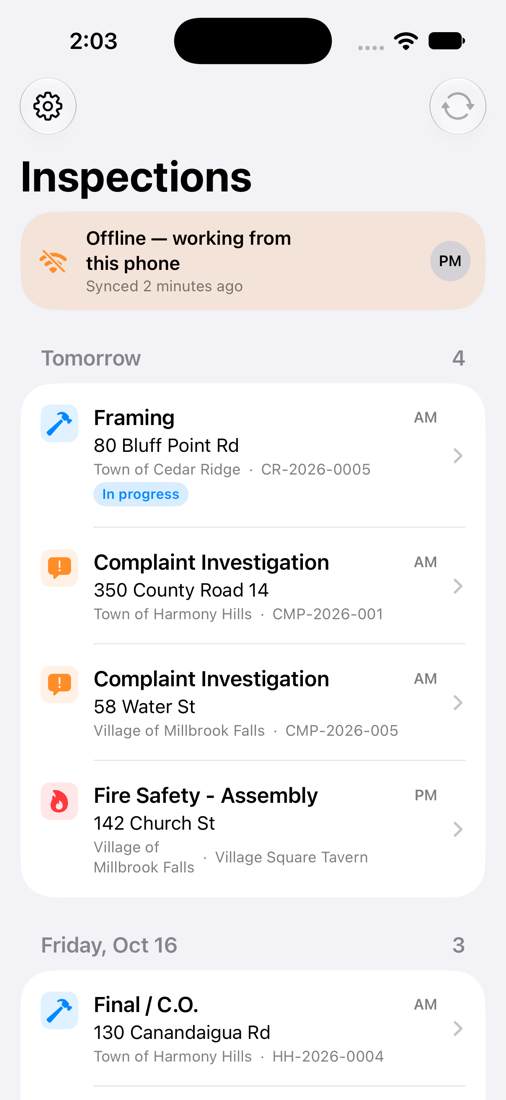
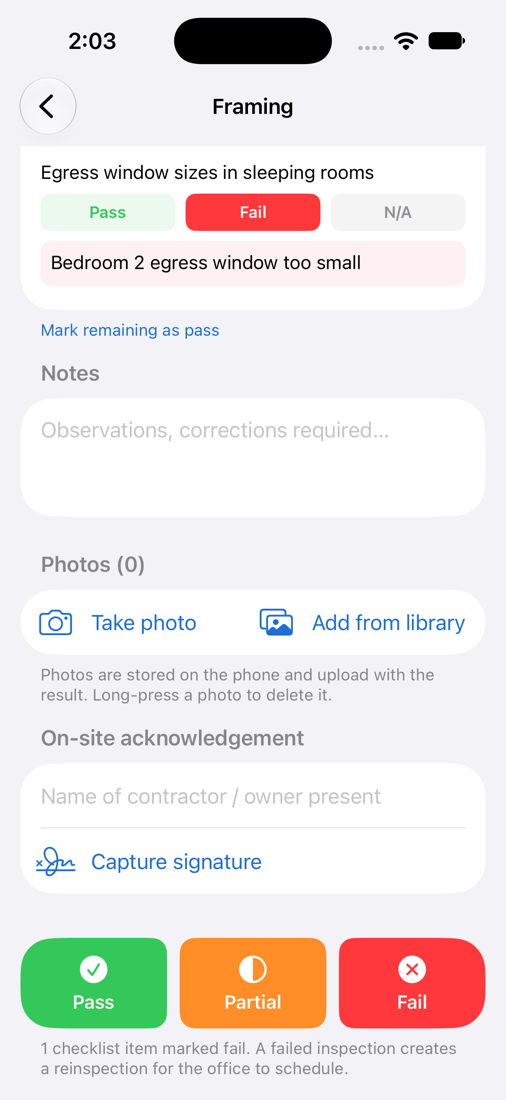
Rural job sites don't always have a signal. The Civicmill app for iPhone and Android downloads the day's inspections with checklists, permit details and the inspection history at each address, so inspectors can work anywhere.
In many small communities, one code officer covers a town and its villages, or several municipalities at once. Civicmill keeps each municipality's fees, permit numbers, permit types, checklists, documents and reports separate, while the officer sees one combined schedule. Office staff see only the municipalities they serve.
Shared-officer arrangements get a multi-municipality discount.
Applicants and contractors pay permit, inspection and operating-permit fees, and fines your municipality collects, by card or bank transfer from the public portal. Funds go directly to your municipality's bank account through our payment partner. Civicmill never holds your money.
Online payment processing is billed at our payment partner's cost plus a small platform rate, set out in your agreement and itemized on a monthly statement.
Online payments are optional. Your municipality decides whether to offer them.
Through the Founding Municipality Pilot, a small group of towns, villages and townships help shape Civicmill. Each gets the full product free for 12 months, with setup and data migration included.
Limited spots for the 2027 building season. Pilots start on your schedule, and winter setup is ideal.
Your first year is free through the pilot. After that, Civicmill is one annual subscription sized to your municipality, quoted in writing before your free year ends. No per-user fees and no long-term contract.
Nothing sold separately
Your whole office, and the field
Onboarding and support included
Villages, towns, townships and cities
Tell us your population and about how many permits you issue in a year, and we'll send you a written quote.
Ask for a quoteNothing happens automatically. Before your year ends we'll review how it went with you and give you a written quote. If you want to continue, you move to an annual subscription at your founding-member price. If not, you keep a complete export of your records.
It's one annual subscription sized to your municipality's population and permit volume, with every feature, unlimited users and support included. Ask for a quote any time. Founding municipalities keep their founding-member price for as long as they stay, and each extra municipality served by the same code officer is discounted.
Yes. The day's inspections, checklists and property details are stored on the phone. Results, photos and signatures save on the device and upload automatically when a connection returns.
That's exactly what Civicmill is designed for. Each municipality keeps its own fees, numbering, permit types, checklists, documents and reports, and the officer works from one combined schedule.
Yes. We import from spreadsheets and common formats as part of setup, and load parcel data from your county's real property records.
Only the people you give an account to. Each person has their own login, with two-factor sign-in available, and administrator, staff or read-only access. Each account sees only the municipalities it serves, so a shared code officer sees each town they serve and nobody else's. Your administrators add and remove people, and every change is recorded with who made it. Civicmill's support staff can see your records to help you, and they sign in with two-factor codes.
No. Civicmill runs in a web browser and on iPhone and Android. We handle hosting, updates and backups.
Each municipality gets its own account with our payment partner, linked to your bank. Payments are deposited to you directly on a regular schedule; Civicmill never holds municipal funds. Processing and the platform rate are itemized on your monthly statement.
On servers in the United States. Everything travels over encrypted connections, your records are backed up, and you can export all of them at any time. If your municipality's policy requires its own server, ask us about running Civicmill on a server you control.
You do. You can export all of your records at any time, during the pilot or after.
Where the electrical inspection comes from a third-party agency's certificate, permit checklists include a step to confirm it's on file before the final inspection. Where your state certifies inspectors by category, each inspection, electrical included, goes only to an inspector certified for it, whether on your staff or with an agency.
Connecticut, Maine, Maryland, Massachusetts, New Hampshire, New York, Ohio, Pennsylvania and Vermont. Choose yours in the state menu at the top of the page to see how Civicmill handles its rules, or tell us which state you'd like next.
See Civicmill with your own municipality's permit types in 20 minutes, online or in person at your town hall.